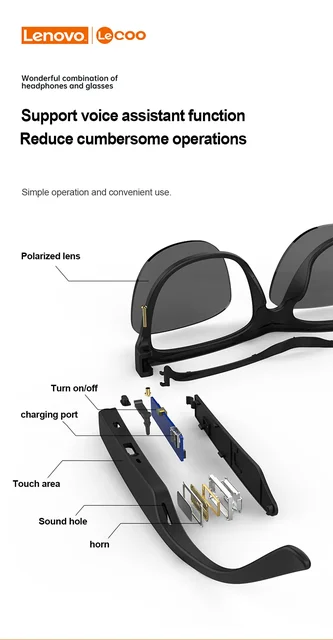
Unlock a World of Audio Brilliance with Lenovo Lecoo C8 Smart Sunglasses! Lenovo Smart Sunglasses C8 Headset Outdoor Sport HiFi Phone Call Music Eyeglasses Bluetooth 5.0 Anti Power On/Off: Long press the MFB button for 2 seconds to power on/off. The blue LED flashes when turning on, accompanied by the voice prompt “power on.” When powered on, enter pairing mode. Activate the Bluetooth on your device, search for “Lecoo-C8” for pairing, and the blue light will flash every 3 seconds after successful pairing. Bluetooth Pairing: Automatically enters pairing mode after disconnection. Auto-connects to the last paired Bluetooth device upon power-on. Automatically shuts down if no Bluetooth connection is detected within 5 minutes. Audio Mode: Single click the touch area for volume , with a prompt sound when reaching maximum volume. Long press the touch area for volume -. Call Mode: Single click the MFB button to answer a phone call. Single click the touch area to reject a phone call. Single click the MFB button to hang up the current call. Voice Assistant: Double-click the MFB button to activate voice assistant. Charging Mode: Charging time is approximately 1.5 hours. Low battery alarm issues a voice prompt “battery low.” Low battery alarm interval is 60 seconds, with the red light flashing twice. The red LED is on during charging, turning blue when fully charged. Notice: Images are for illustration purposes only, and the actual product design may vary. Important Tips: Do not exceed 3 hours when charging through the computer USB interface. Use a charger to avoid potential failures and damage to the built-in lithium battery. The product is not waterproof; avoid soaking it in water to prevent damage. �� Elevate your audio experience with Lenovo Lecoo C8 Smart Sunglasses — where innovation meets style! ��️�� #LenovoLecooC8 #SmartSunglasses #AudioInnovation #LenovoTech #StayConnected Show More Show Less